

Most landscaping companies don't have a marketing problem. They have a consistency problem. The GBP gets claimed in March, loaded with a few phone photos, then ignored until a bad review shows up in July and nobody remembers the password. Meanwhile the competitor two towns over is posting weekly, answering questions, and quietly eating your map pack rankings.
This playbook is built the way a crew leader would build it: a 12‑month schedule with specific tasks, templates you can copy, and clear handoff rules so field work actually feeds your local SEO instead of disappearing into a truck cab. The goal isn't to turn you into a marketer. It's to make local SEO for landscapers run like a route — predictable, assignable, and measurable.
Before getting into the calendar, there's something most people get wrong from the start.
The ranking problem nobody tells you about: proximity vs. relevance
For broad searches like "landscaping near me," proximity to the searcher is the single biggest ranking factor — and you can't control it. Someone standing in a neighborhood you rarely service will see the companies physically closest to them, almost regardless of how polished your profile is.
What you can control is relevance and prominence, and that's where almost everyone leaves money on the table. The businesses that win aren't the ones with the flashiest website. They're the ones whose GBP category list, services, review language, and website pages all say the same specific things about the same specific places.
A typical example: a company lists "Landscaper" as its only category, has a homepage that says "we serve the greater metro area," and has 18 reviews that all just say "great job." Google has almost nothing to work with. No city, no service specificity, no signal tying the business to "paver patio installation in Westfield." So it ranks for nothing in particular.
Specificity is the entire game. Everything below runs through that idea.
Month-by-month build: the 12-month calendar
You don't do everything at once. You stack. The sequence below is roughly aligned to how landscaping demand moves through a year in most northern markets. Shift the months if you're in a warm climate — the sequence matters more than the exact dates.
Never miss a job detail again.
Yardyly helps you plan, confirm, and manage every landscaping project seamlessly.
- Centralized project scheduling
- Automated client updates
- Crew and resource management
No credit card required
| Months | Primary focus | Key deliverables |
|---|---|---|
| Jan–Feb (slow season) | Foundation | GBP deep optimization, categories, services, service-area pages, schema |
| Mar–Apr (ramp) | Visibility push | Weekly GBP posts, citation cleanup, review request system live |
| May–Jul (peak) | Volume & reviews | Field-crew review handoff, Q&A seeding, landing page CRO |
| Aug–Sep | Conversion tuning | Track which pages convert, kill dead keywords, add reviews with photos |
| Oct–Nov | Retention & content | Seasonal service posts, re-sign campaigns, refresh photos |
| Dec | Audit & plan | KPI review, citation re-check, plan next year's content |
The reason this works: heavy technical setup happens when your crews aren't slammed, and the review-generation machine runs hottest exactly when you're doing the most jobs. Most owners try to fix their GBP in June and never finish because the phone won't stop ringing.
Step 1: Google Business Profile setup that actually ranks
Claiming the profile is the easy part. Here's the optimization sequence that moves the needle, in order of impact.
-
Primary category. Pick the most specific one that matches your highest-margin work. "Landscaper" is fine as a catch-all, but if you want patio and hardscape jobs, "Landscape Designer" or a hardscape-specific category may serve you better as primary. Your primary category carries more weight than the rest combined.
-
Secondary categories. Add every relevant one — lawn care service, snow removal service, irrigation system, tree service if you do it. Each one opens a door to a different search.
-
Services section. Wildly underused. Add individual services with real descriptions: "Paver Patio Installation," "Spring Cleanup," "Mulch Delivery & Install," each with 2–3 sentences using the words customers actually type.
-
Service area. List the specific cities and towns you serve, not a radius. Name them.
-
Business description. 750 characters. Lead with what you do and where, not your founding story. "We install paver patios, retaining walls, and full landscape designs for homeowners in [City] and [surrounding towns]."
-
Photos. Upload geo-tagged job photos in sets — before/after, crew on site, finished work. Keep adding them monthly. A profile with five photos looks dead; one with 80 looks like a real operation.
-
Products. Use this for packaged services with pricing ranges if you're comfortable — "Spring Cleanup Package, starting at $X."
Businesses that fill out the Services section thoroughly tend to show up for long-tail searches their competitors never rank for. "Retaining wall repair [town]" has low volume but high intent, and almost nobody optimizes for it. That's where the booked jobs hide.
Step 2: The seasonal GBP post calendar
GBP posts expire and most don't drive huge traffic directly — but consistent posting signals an active, legitimate business, and it keeps fresh keywords and photos flowing into your profile. The trick is building a rotation you can hand off to someone in about 15 minutes a week.
-
Spring cleanup offers, mulch specials, "booking now for May installs," aeration/seeding education
-
Summer finished project showcases with photos, watering/maintenance tips, "limited install slots left"
-
Fall leaf cleanup, fall planting, winterization, snow removal pre-sign offers
-
Winter planning/design offers, early-bird spring booking, off-season content, gift certificates for maintenance
One post a week, and every post needs a real photo from an actual job — not stock imagery. Google and customers both reward real work. Rotate between offer posts, showcase posts, and education posts so it doesn't read like a billboard.
Step 3: Citations and the "same-exact-info" rule
Citations — your business listed on directories like Yelp, Angi, HomeAdvisor, BBB, Nextdoor, and industry sites — still matter, but not the way SEO blogs from 2015 claimed. You don't need 300 of them. You need your core listings to be identical and accurate.
-
Pick your exact business name, address format, and phone number. Write it down. This is your canonical NAP.
-
Audit your top 10–15 citation sources and make every one match character-for-character.
-
Kill or correct duplicate listings — old addresses from when you moved, duplicate GBPs, abandoned Yelp pages.
-
Prioritize landscaping-relevant and local directories over generic mass-citation services.
Review request script you can text: > "Hi [Name] — thanks again for choosing us for your [patio/cleanup/install]. If you were happy with the work, it'd mean a lot if you left a quick Google review — here's the link: [link]. Takes about 30 seconds and really helps our small crew. Thank you!"
Keep it short. Long requests get ignored.
Step 4: Service-area pages and landing pages that convert
This is where the website does its job. If you serve eight towns, you should not have one "service areas" page listing all eight. You need individual pages — one per town, or at least per cluster — each written specifically for that place.
-
The town name in the H1, title tag, and naturally through the body
-
Specific neighborhoods, landmarks, or local references
-
The actual services you perform there
-
Real photos from jobs in or near that area
-
Reviews from customers in that town
-
A clear call to action and a form above the fold
{ "@context": "https://schema.org", "@type": "LandscapingBusiness", "name": "Green Valley Landscaping LLC", "image": "https://yoursite.com/photo.jpg", "telephone": "+1-555-555-5555", "areaServed": "Westfield, NJ", "address": { "@type": "PostalAddress", "addressLocality": "Westfield", "addressRegion": "NJ", "postalCode": "07090" }, "aggregateRating": { "@type": "AggregateRating", "ratingValue": "4.9", "reviewCount": "47" } }
Don't spin up 40 thin, near-identical town pages. Google treats that as doorway-page spam and it can hurt you. Build pages only for towns where you actually work and can write something genuine. Five strong pages beat forty empty ones every time.
Step 5: The CRO checklist — because visibility without conversion is just ego
Ranking well and still not booking jobs is more common than most owners expect. Traffic shows up, bounces, and the owner assumes SEO doesn't work. Usually the page is failing, not the ranking.
-
[ ] Phone number clickable and visible without scrolling (mobile first — most of your traffic is on phones mid-driveway)
-
[ ] A form that asks for the minimum
name, phone, address, service needed
-
[ ] Response-time promise stated ("We reply within 1 business day")
-
[ ] Real photos of your crew and finished work, not stock
-
[ ] At least 3 reviews visible on the page
-
[ ] Service area clearly stated
-
[ ] Trust signals
licensed, insured, years in business
-
[ ] Page loads in under ~3 seconds on mobile
-
[ ] One primary call to action, repeated — not five competing buttons
The highest-leverage fix is making the phone number a giant, tappable button at the top on mobile. Homeowners standing in their yard want to call, not fill out a form. Lowering that one bit of friction tends to lift calls noticeably.
Step 6: The field-crew handoff — where most review systems die
Your review-generation strategy fails not because the script is bad, but because nobody knows whose job it is to trigger it. The crew finishes, packs up, drives off, and the review request never happens because it lived in the owner's head.
Fix it with a dead-simple handoff rule:
-
Crew leader marks the job "complete" in your system before leaving the site.
-
That completion triggers a review request — either automatically, or as a task for the office the same afternoon.
-
Only trigger requests on jobs the crew leader flags as "customer happy." Don't ask for a review 20 minutes after a difficult walkthrough.
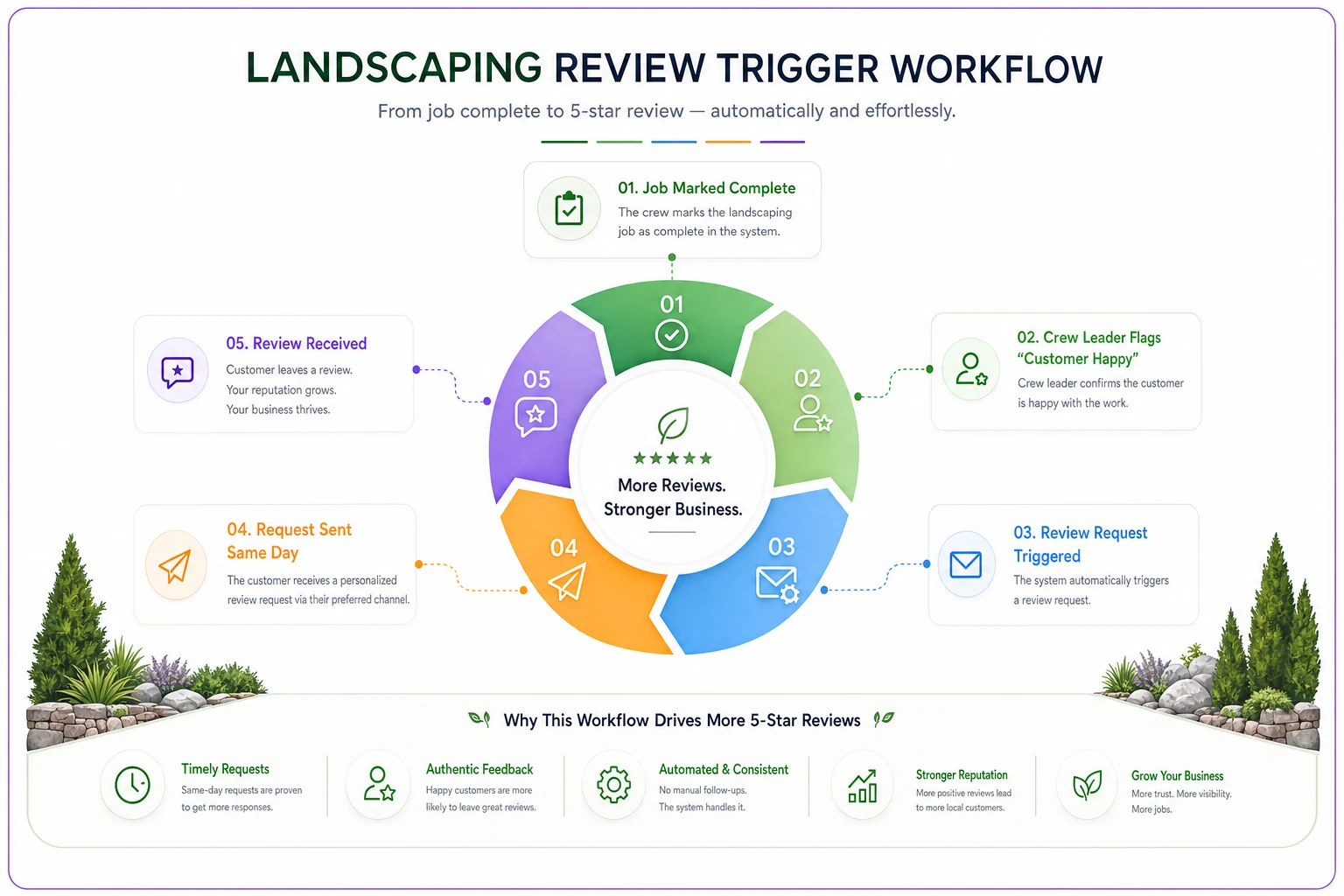
This completion-to-request link is the same kind of handoff discipline that keeps crews from running out of materials mid-route — the problem isn't effort, it's that the trigger never fires. We've written about that failure mode in the context of per-truck reorder rules and mid-shift shortages, and the lesson transfers directly: an action that depends on someone remembering will fail at scale. Build the trigger into the workflow.
The same goes for overrides and exceptions. When a crew gets rerouted or a job runs long, review timing slips — which is why clear policies around manual overrides and float crews matter more to your marketing than they might look. Operations and marketing aren't separate departments. The field is where reviews are earned or lost.
Step 7: CRM tagging rules that connect visibility to revenue
If you can't tell which leads came from your GBP versus referrals versus paid ads, you're flying blind and you'll cut the wrong budget. Simple tagging fixes this.
-
Source GBP / organic search / referral / repeat / paid / Nextdoor
-
Service requested the specific service line
-
Town for matching against your service-area page performance
-
Status new → quoted → won → lost
-
Lost reason price / timing / no-response / went-with-competitor
The "no-response" lost reason is the one that'll sting. When you see a chunk of leads marked no-response, that's booked revenue you never touched because follow-up fell through the cracks. That gap connects directly to how you protect accounts over time — the same discipline behind avoiding pricing governance mistakes that break renewals applies to your lead pipeline: the leaks are usually in the handoffs, not the headline number.
The five KPI trackers to run monthly
You don't need a dashboard with 40 metrics. Five numbers will tell you if the machine is working.
| KPI | What it tells you | Rough healthy signal |
|---|---|---|
| GBP calls & direction requests | Is your profile driving contact? | Steady month-over-month growth in season |
| Website form submissions by town | Which service-area pages convert | Each priority town producing some flow |
| Review velocity | New reviews per month | Several per month during peak season |
| Lead-to-booked rate | Are you closing the traffic? | Most owners sit well below where they could |
| Cost per booked job by source | Where your money actually works | GBP/organic should beat paid over time |
Pull GBP calls and direction requests straight from the profile's performance tab. Pull the rest from your CRM tags. Fifteen minutes a month. The point isn't precision — it's noticing when a number moves and asking why.
A real scenario: before and after
A two-crew design/build company in a mid-size suburban market had a claimed GBP with around 22 reviews, one generic "service areas" page, and no posting habit. They ranked okay for their home town and nowhere else. Lead flow was almost entirely referral — fine until a slow spring made them nervous.
Over about four months they ran the foundation work: rebuilt categories and services, added six real service-area pages for the towns they actually worked in, got the review handoff onto the crew leaders, and started posting weekly with job photos.
The change wasn't overnight. Reviews climbed from the low 20s to the mid-40s over the season. Direction requests and calls from the profile roughly doubled by midsummer. More importantly, their CRM tags showed GBP-sourced leads closing at a better rate than their paid ads ever had, at a fraction of the cost — because those leads were specific, local, and already looking at finished work before they called. They scaled back on third-party lead platforms the following year.
Nothing about that is magic. It's the same work, done consistently, in the right order.
When this is worth it — and when it isn't
This makes sense when: you serve a defined set of towns, you do repeatable services you can describe specifically, and you have someone — owner, office manager, or crew leader — who can own the 15-minute weekly tasks.
This is a bad fit when: you're a one-person operation already booked solid for the year. If you can't take on more work, driving more leads just means more phone calls you can't answer, which annoys people and can generate bad reviews. Fix capacity first.
Who should skip the heavy build: brand-new businesses with zero reviews and no photo library. Spend your first season doing great work and collecting reviews and photos. You can't optimize a profile that has nothing real to show. Build the ammunition first, then run the system.
Bringing it together
Local SEO for landscapers isn't a one-time project you finish and forget. It's a seasonal rhythm — heavy setup in the slow months, review and content momentum through peak, and a quiet audit before you plan the next year. The companies that win aren't doing anything exotic. They're doing specific, assignable tasks on a schedule, tying the field work to the follow-up, and actually looking at five numbers once a month.
Start with the foundation this off-season. Get the categories, services, and service-area pages right. Put the review handoff on your crew leaders so it fires every time. Tag your leads so you can see what's working. Then let the calendar run. The visibility compounds, and more importantly, it converts — which is the only part that pays for the truck.
Start with the foundation this off-season. Get the categories, services, and service-area pages right. Put the review handoff on your crew leaders so it fires every time. Tag your leads so you can see what's working. Then let the calendar run. The visibility compounds, and more importantly, it converts — which is the only part that pays for the truck.
Ready to grow your landscaping business?
Join 2,000+ landscaping pros using Yardyly to save time, reduce task chaos, and deliver outstanding client results.