



Most landscaping companies with 2-5 crews waste somewhere between 90 and 150 minutes every day on inefficient routing. That's pure drive time — no revenue, no billable work. You're burning $35-50 in fuel, putting unnecessary miles on equipment, and watching crew hours disappear while everyone sits in traffic instead of cutting grass.
The standard advice is to buy expensive route optimization software that promises magical 30% efficiency gains. What actually happens: you spend $200-400 a month on something your crew chiefs ignore because it doesn't account for school zones at 3pm, that left-turn nightmare on Route 9, or the fact that Mrs. Henderson absolutely needs service before noon on Thursdays.
The companies that consistently run tight routes don't rely on fancy algorithms. They use simple geographic clustering rules, time-window batching, and departure-time rules that any crew chief can follow with a printed map and some basic common sense.
Why Traditional Route Planning Falls Apart for Landscaping
Your routing challenges are fundamentally different from package delivery or HVAC service calls. A UPS driver handles 150 stops with 2-minute interactions. Your crew spends 25-45 minutes at each property, which means even perfect routing only saves you 5-7 minutes between stops. The real gains come from batching compatible properties and avoiding traffic patterns that kill momentum.
Landscaping routes fail for three specific reasons that software rarely addresses.
First, your service windows aren't just customer preferences — they're operational requirements. You can't mow wet grass before 9am. You can't run mowers during naptime at properties near daycares. Commercial properties want service done before business hours. These constraints create routing puzzles that pure distance optimization can't solve.
Second, your equipment creates routing dependencies that delivery routes don't face. A crew running walk-behind mowers moves completely differently than one hauling a 60-inch zero-turn on a trailer. Tight residential neighborhoods turn into time sinks when you're maneuvering trailers through narrow streets. Properties requiring special equipment force detours that distance-based routing misses entirely.
Third, crew productivity varies dramatically based on how drive time is distributed throughout the day. Three 10-minute drives between morning jobs keeps energy high. One 30-minute highway stretch at 11am kills momentum and usually triggers an early lunch. The psychological impact of routing on crew performance matters more than saving 5 miles of total distance.
Geographic Clustering Without Software
The most effective manual routing system starts with geographic clusters based on drive-time boundaries, not distance. Take your service area and divide it into zones where any two properties within a zone are no more than 12 minutes apart during typical service hours. For most suburban landscaping operations covering a 15-mile radius, this usually creates somewhere between 6 and 10 zones.
Never miss a job detail again.
Yardyly helps you plan, confirm, and manage every landscaping project seamlessly.
- Centralized project scheduling
- Automated client updates
- Crew and resource management
No credit card required
The critical thing to understand: these zones aren't circles on a map. They follow traffic patterns. A zone might stretch 8 miles along a major corridor but only 2 miles perpendicular to it. Properties on opposite sides of a river might be 1 mile apart as the crow flies but 20 minutes apart in reality. Your zones should reflect actual drive times at 10am on a Tuesday, not theoretical distances.
Print a large map of your service area and use different colored highlighters for each zone. Mark every regular customer with a colored dot matching their zone, and add black dots for one-time or irregular services. This visual system immediately shows clustering opportunities that spreadsheets and customer lists tend to obscure.
Within each zone, identify anchor properties — large commercial accounts, HOA entrances, or properties with strict time requirements. These anchors become the framework around which you build daily routes. A typical zone might have 2-3 anchors that determine when crews can service that area.
The clustering rules that actually work:
-
Never send a crew to a zone for fewer than 3 properties unless it's a high-margin job over $200. The setup and transit time isn't worth it for small clusters. Either batch those properties with another day's route or negotiate some schedule flexibility with the customer.
-
Assign each zone primary and secondary service days. Zones get serviced on their primary day unless weather or workload forces a shift. This predictability helps customers plan and keeps scheduling complexity manageable. A zone with 30 weekly properties might run Monday/Thursday as primary days with Tuesday as overflow.
-
Build buffer zones where clusters overlap. These 5-8 properties sit between major zones and can float between routes based on daily efficiency needs. If Monday's Zone 3 route runs light, pull a couple of buffer properties from the Zone 3/4 overlap area.
-
Track zone density weekly. When a zone consistently requires more than one crew or routinely runs past 5pm, it's time to split it. When zones drop below 15 weekly properties, merge them with adjacent areas or redistribute.
Use distinct colors for buffer properties so crew chiefs can quickly spot float options on a busy day.
When a zone consistently requires more than one crew or routinely runs past 5pm, it's time to split it. When zones drop below 15 weekly properties, merge them with adjacent areas or redistribute.
Time-Window Batching That Actually Works
Time-window batching for landscaping operates on different principles than most other service industries. Your windows aren't just about customer availability — they're about grass moisture, traffic patterns, noise ordinances, and crew energy.
Start by putting every property into one of four time-window buckets:
Morning-critical (7am-10am): Commercial properties that need to be done before business hours, properties with afternoon shade that stays wet, elderly customers who are early risers, properties near schools that become inaccessible after 2:30pm.
Midday-flexible (10am-2pm): Most residential properties, vacant lots, properties with full sun exposure, customers who work from home, properties with no specific time preferences.
Afternoon-preferred (2pm-5pm): Properties that dry slowly in the morning, commercial properties preferring end-of-day service, properties where owners return home early and want to supervise, properties requiring debris removal that needs an afternoon dump run.
Time-locked: Properties with inflexible requirements — Thursday trash day conflicts, HOA regulations about service days, properties near venues with specific quiet hours, medical facilities with strict appearance windows.
The batching system layers these time windows onto your geographic zones. A properly batched route might look like: Start with two morning-critical properties in Zone 2, transition to four midday-flexible properties in the same zone, then move to Zone 3 for three afternoon-preferred properties. You take a small hit on geographic efficiency, but the time-window compliance prevents callbacks and complaints.
A practical batching template for a single crew day:
| Time Slot | Property Type | Zone Priority | Drive Time Budget |
|---|---|---|---|
| 7:00-8:30 | Commercial morning requirements | Primary zone only | Max 8 minutes between |
| 8:30-10:30 | Morning-critical residential | Primary zone + adjacent | Max 12 minutes between |
| 10:30-12:00 | Midday-flexible batch 1 | Primary zone | Max 10 minutes between |
| 12:00-1:00 | Lunch + transit to afternoon zone | - | Up to 20 minutes transit |
| 1:00-3:00 | Midday-flexible batch 2 | Secondary zone | Max 10 minutes between |
| 3:00-5:00 | Afternoon-preferred | Secondary zone | Max 15 minutes between |
Notice how drive time budgets increase later in the day. Morning routes stay tight because traffic is worst and crew energy is highest. Afternoon routes can spread out slightly because highways clear up and crews naturally slow down anyway.
Departure-Time Heuristics and Traffic Reality
The single most impactful routing decision happens before crews even leave the shop: departure timing. A 15-minute departure adjustment can save 25 minutes of daily drive time just by avoiding school zones, rush hour bottlenecks, and shift changes at major employers.
Map your major traffic obstacles and their active windows. Every landscaping operation has a handful of recurring traffic nightmares — the school that backs up three blocks from 7:45-8:15am, the interstate interchange that clogs from 4:30-6:00pm, the lunch rush around the business district from 11:45am-12:45pm. These patterns repeat daily and routes need to account for them.
Build departure rules based on first-property location. If the first property sits beyond a school zone, leave at 7:15am or 8:20am — never in between. If you're starting in the downtown commercial district, arrive before 7:00am or after 9:00am when parking opens up. Simple rules like these prevent crews from sitting in completely predictable traffic.
Northern suburbs (school-heavy): Depart 6:45am or 8:25am, never 7:00-8:15am
Commercial corridor: Depart 6:30am for early arrival or 9:00am to miss rush hour
Eastern residential: Flexible departure, avoid 3:00-3:45pm return time
Southern rural: Depart 7:00am sharp to complete before afternoon heat
Western mixed-use: Depart 6:45am or 8:45am, avoid shift change at 7:30am
Adjust departure times seasonally. Spring routes can leave 30 minutes earlier when grass grows fast and days are longer. Summer routes might delay to 7:30am when morning dew sticks around. Fall routes compress into midday windows when leaves are dry. Winter maintenance follows completely different patterns based on snow and ice timing.
Build contingency departures for common delays too. If equipment maintenance runs late and the 7:00am departure slips to 8:30am, that's not just a time shift — it's a modified route that skips morning-critical properties and reschedules them to tomorrow's early slot. Having that contingency written down saves the morning scramble.
Building Your Daily Route Sheet
The practical output of all this planning is a one-page daily route sheet that crew chiefs can follow without confusion. This isn't a turn-by-turn GPS printout — it's a strategic document that provides structure with enough flexibility to handle real-world surprises.
Essential elements for the route sheet:
-
Zone sequence and transition times "Zone 2 until 10:30, transit to Zone 4, complete by 2:00, finish in Zone 3"
-
Anchor properties with time windows "Harrison Office Complex before 8:30am, Riverside HOA entrance before noon"
-
Flex properties for efficiency "If running ahead, add Jenkins property (Zone 2/3 border) or Smith vacant lot (Zone 3)"
-
No-go windows "Avoid Maple Street 2:45-3:30 (school pickup), skip downtown 11:30-1:00 (lunch traffic)"
-
Equipment notes "Properties 3 and 4 need push mower for hills, property 7 requires grass catcher"
-
Communication triggers "Text office after completing property 5 for afternoon update"
The route sheet should also include a simple efficiency tracker — crews mark actual arrival and departure times for each property. Not for micromanagement, but to catch routing problems. When three consecutive weeks show 25-minute transit between two supposedly close properties, you've found a routing black hole that needs fixing.
Here's a quick visual of the route-sheet workflow.
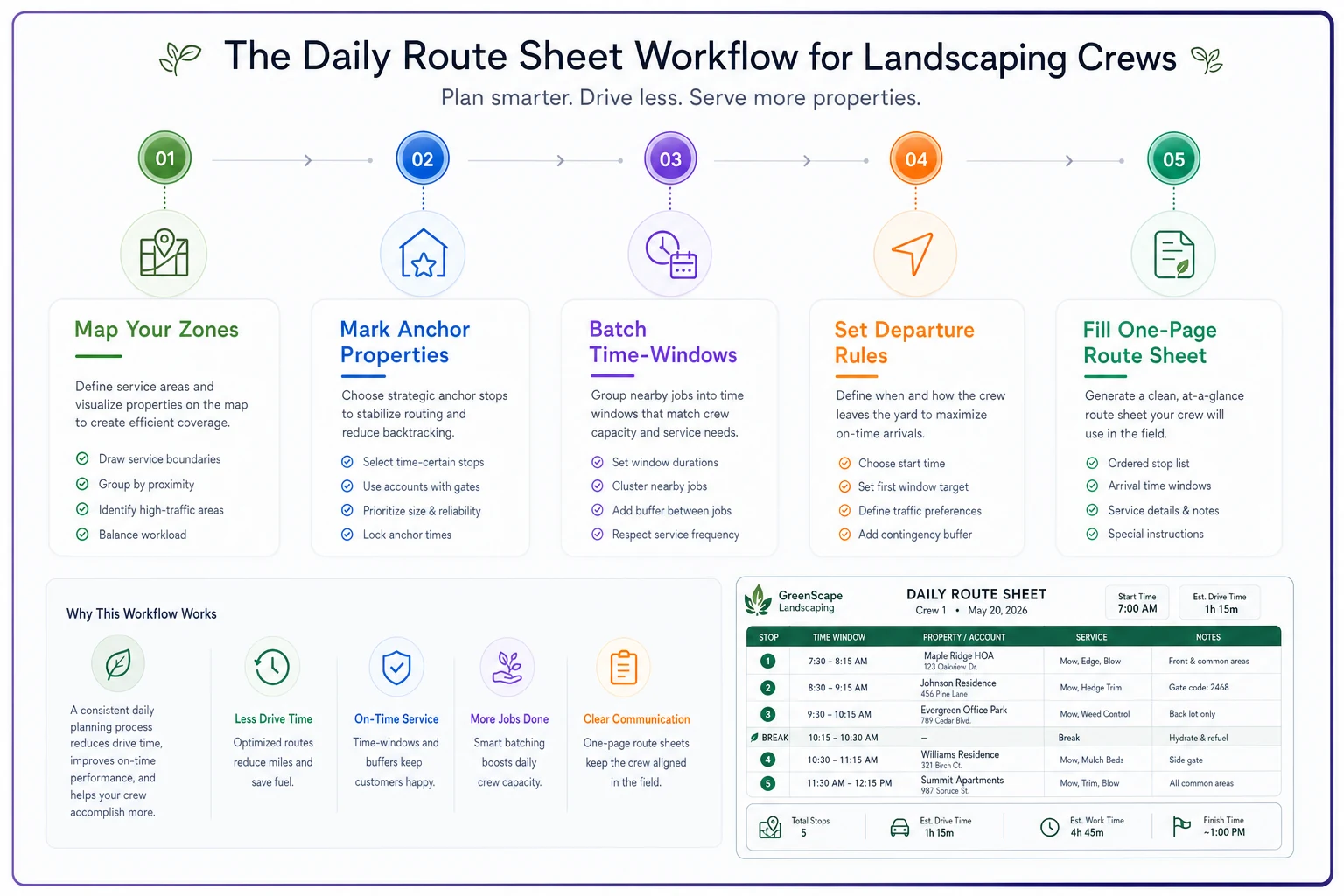
Build route sheets the night before, not the morning of service. This gives crew chiefs time to review the plan, flag potential issues, and suggest modifications based on their ground-level knowledge. A crew chief might notice you've scheduled two properties that share a property line as morning and afternoon stops — an obvious inefficiency that geographic clustering can miss when you're staring at a map from an office.
Real-World Results from Manual Optimization
A concrete example: a 3-crew landscaping company in suburban Charlotte was running routes planned by expensive software that promised 25% efficiency gains. Their actual results were crews averaging 85 minutes daily windshield time, missing time windows twice a week, and dealing with constant last-minute route changes.
They switched to manual clustering with time-window batching. The setup took one weekend — mapping zones, categorizing properties by time requirements, and writing out departure-time rules. No software subscription, no training complexity, just printed maps and clear rules.
-
Average windshield time dropped to 65 minutes (roughly 24% reduction)
-
Time window violations essentially disappeared
-
Fuel costs decreased by around $280 monthly
-
Crews reported less fatigue and better job satisfaction
-
Friday routes consistently finished 45 minutes earlier
The key difference wasn't total routing distance — the software actually created slightly shorter routes. But the manual system accounted for real operational constraints the software ignored. Crews stopped sitting in school traffic, arrived at properties when grass was dry, and maintained a steady work rhythm instead of racing between spread-out jobs.
When Manual Routing Breaks Down
Manual optimization works well until you hit certain scale thresholds. Beyond 5 crews or somewhere around 200 weekly properties, the complexity starts to overwhelm simple clustering rules. When you're juggling 15+ time-locked properties daily or operating across multiple cities, geographic zones blur and manual tracking becomes a full-time job.
Signs you've outgrown manual routing:
-
Route planning takes more than 2 hours daily. If someone is spending half their morning shuffling properties between routes, you need systematic help. The labor cost alone justifies a better solution.
-
Crews regularly deviate from planned routes. When route sheets become suggestions rather than plans, your manual system has failed. Either the routes don't reflect reality or crews don't trust the planning.
-
Customer complaints about timing are increasing. Missing time windows occasionally is operational reality. Missing them weekly means your batching system can't handle the complexity.
-
You're turning down profitable work because customers don't fit your zones. When rigid clustering is costing growth opportunities, it's time to reconsider the approach.
This is where AI-powered operational software becomes genuinely valuable — not as a replacement for understanding routing principles, but as a tool that applies those same concepts at scale. Modern platforms can maintain your geographic clusters while dynamically adjusting for daily variables, track actual drive times to refine zone boundaries, and balance time windows across multiple crews without the manual juggling.
The most successful landscape companies combine manual routing wisdom with selective automation. They understand why routes work, maintain the clustering and batching principles that fit their operation, but let technology handle the daily complexity of assigning 150 properties to 5 crews while respecting 30 different time constraints.
Making Manual Routing Sustainable
The biggest failure point for manual routing isn't complexity — it's inconsistency. A perfect routing system applied twice a month is worse than a simple system used every single day. Build sustainability into the process from the start.
Assign route planning to someone who understands field operations, not just logistics. Your office manager might be excellent at scheduling, but if they've never pulled a mower off a trailer in the rain, they'll miss routing nuances that only become obvious in the field. The ideal route planner has field experience and knows why certain properties can't follow others in a sequence.
Review and adjust zones monthly, not constantly. Resist the urge to redraw boundaries every time you gain or lose a customer. Small frequent adjustments create confusion and break the geographic patterns crews start to memorize. Make zone changes in batches, communicate them clearly, and give crews time to adapt.
Document routing rules in plain language. "We don't service Zone 4 on Mondays because of farmers market traffic" is better than a complex decision tree that nobody reads. When rules are simple enough to explain to a new crew chief in 5 minutes, they actually get followed.
Track the metrics that matter: windshield time per property serviced, time-window compliance rate, and fuel cost per revenue dollar. When windshield time creeps up 2 minutes per property over three months, your zones need adjustment.
Build seasonal route templates instead of starting from scratch each spring. Your April routes will look similar every year — same properties getting weekly service, same traffic patterns, same time windows. Start with last year's successful routes and modify for changes rather than rebuilding from zero.
The Path Forward
Route optimization for small landscaping fleets doesn't require artificial intelligence or expensive software subscriptions. It requires understanding your local traffic patterns, respecting operational constraints that algorithms miss, and building simple systems your crews will actually follow.
Start with geographic clustering based on real drive times. Layer in time-window batching that reflects both customer needs and operational reality. Add departure-time rules that keep crews out of predictable traffic. Document everything on simple route sheets that provide structure with flexibility.
The companies winning at routing aren't the ones with the fanciest technology. They're the ones who understand that landscaping routes are about more than distance — they're about timing, crew energy, equipment constraints, and local knowledge that no algorithm can fully capture. Manual optimization forces you to understand these factors deeply.
Once you've mastered manual routing principles, you'll know exactly what to demand from routing technology if you eventually need it. You'll recognize when software suggestions don't match operational reality. You'll understand why certain algorithmic recommendations would fail in practice. And you'll maintain routing quality whether your technology works perfectly or breaks down completely.
The difference between landscaping companies that consistently profit and those that struggle often comes down to 20 minutes of daily windshield time. Manual route optimization, done right, captures those 20 minutes without the complexity, cost, or learning curve of advanced routing tools. Your crews stay productive, customers stay happy, and fuel costs stay under control.
Ready to grow your landscaping business?
Join 2,000+ landscaping pros using Yardyly to save time, reduce task chaos, and deliver outstanding client results.